 Infrasity
How to Fetch Cluster Mapping Data for Your Org Using Content Hub MCP
Pull an org-wide view of how your topics are distributed across clusters, drill into any one cluster's topic list, and ask Claude for takeaways, all from a Claude Desktop chat over Content Hub MCP.
Cluster mapping shows how your published and drafted content is actually distributed across your clusters: which ones are dense, which are thin, and how many topics haven't been assigned to a cluster at all. That distribution matters because it tells you where your content effort has gone so far, and where the next sprint's topics would fill a real gap instead of piling onto a theme you've already covered. Once Claude Desktop is connected to Infrasity's Content Hub via MCP, you can pull that picture, drill into any one cluster's topic list, and ask for a read on what it means, in a handful of chat messages.
Before you start, make sure:
- Claude Desktop is connected to Content Hub via MCP (see the Content Hub MCP setup guide if you haven't done that yet)
- Your org already has topics in Content Hub, ideally with some of them mapped to clusters
Here's the flow, from an org-wide overview down to a single cluster and what it tells you.
Fetch the cluster mapping overview
Ask for the mapping data by org name, for example:
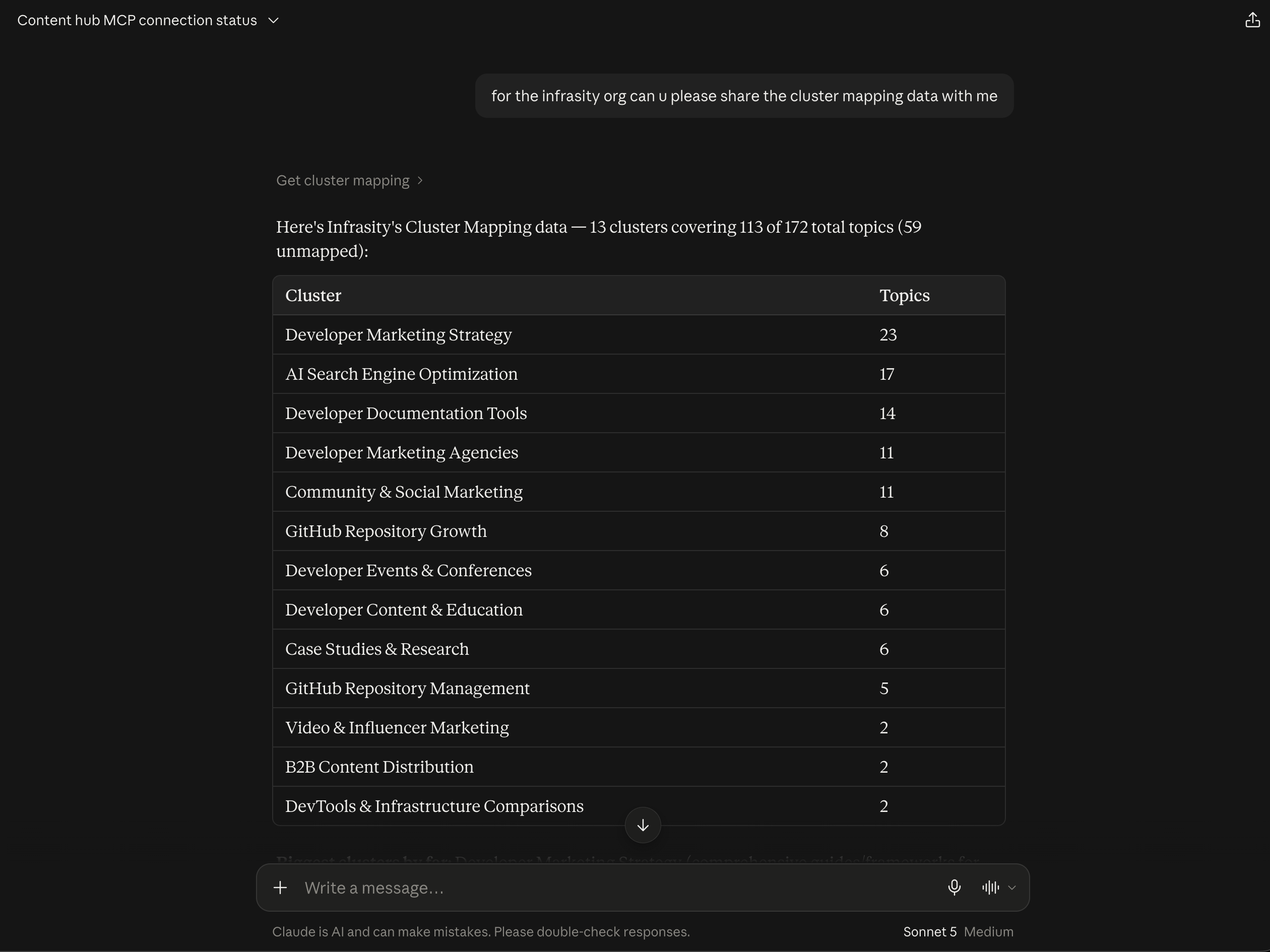
"for the infrasity org can u please share the cluster mapping data with me"
Claude returns a ranked table of every cluster and how many topics fall under it, along with the coverage picture as a whole. For Infrasity that came back as 13 clusters covering 113 of 172 total topics, leaving 59 unmapped. Developer Marketing Strategy leads with 23 topics, followed by AI Search Engine Optimization at 17 and Developer Documentation Tools at 14, while the tail (Video & Influencer Marketing, B2B Content Distribution, and DevTools & Infrastructure Comparisons) sits at just 2 topics each.
That one table answers two questions at once. The top of the list shows where your content effort is already concentrated, and the unmapped count shows how much of your library isn't assigned to any cluster yet, which is usually the first thing worth cleaning up, since a topic with no cluster can't contribute to any cluster's coverage picture.
Pull the topics inside a specific cluster
Once a cluster looks worth a closer look, ask for its topic list by name, for example:
"share the topics in Developer Marketing Agencies"
The mapping data only stores topic IDs, not titles, so Claude explains the extra step this takes
before doing it: the memberships map is just topic UUIDs pointing to cluster UUIDs, and there's
no tool that resolves those IDs to names directly. It then tries the more efficient route first,
filtering with list_topics rather than fetching all 11 topics one at a time, and returns the
full list with each topic's title, status, focus keyword, and monthly search volume (MSV).
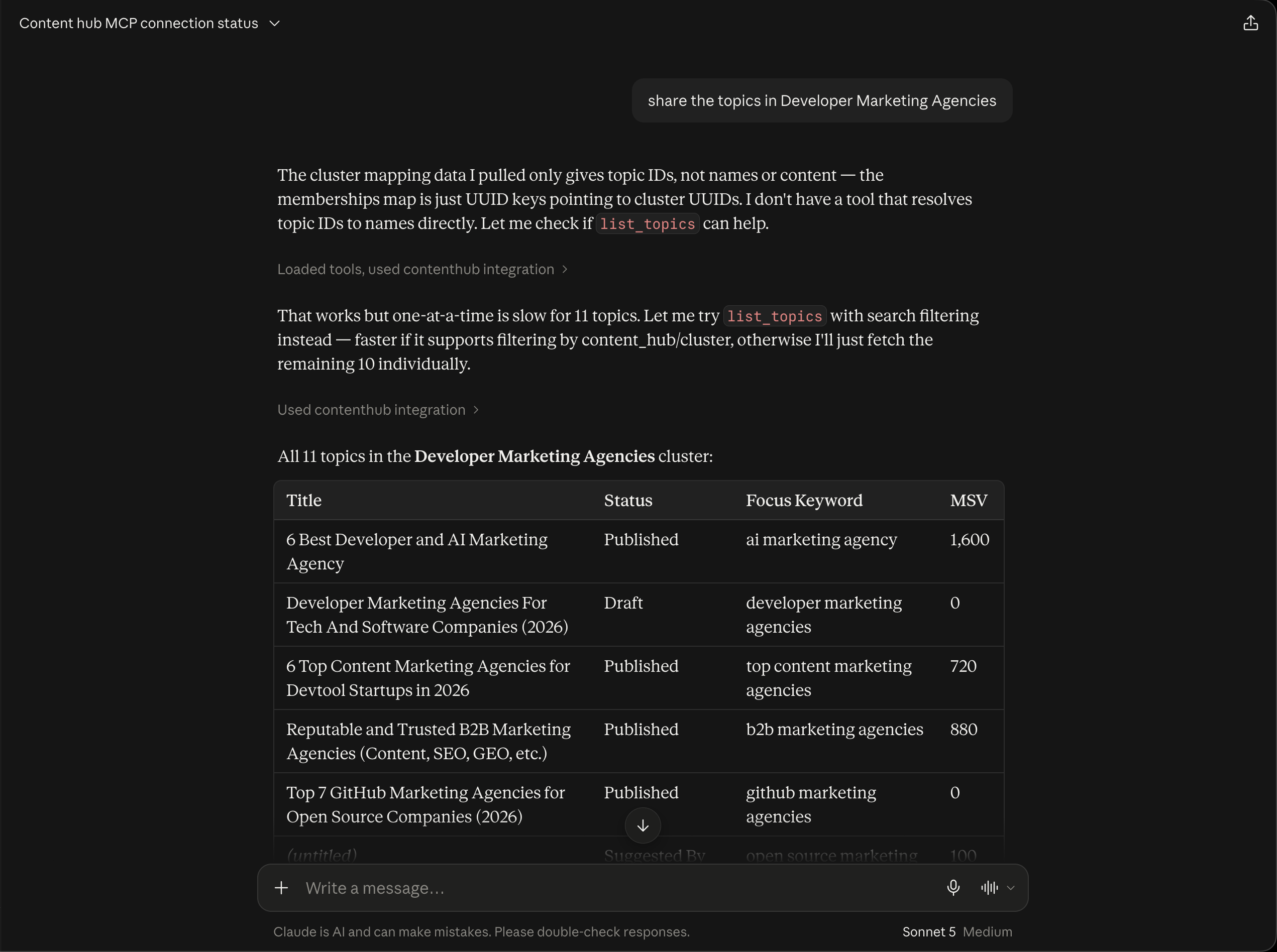
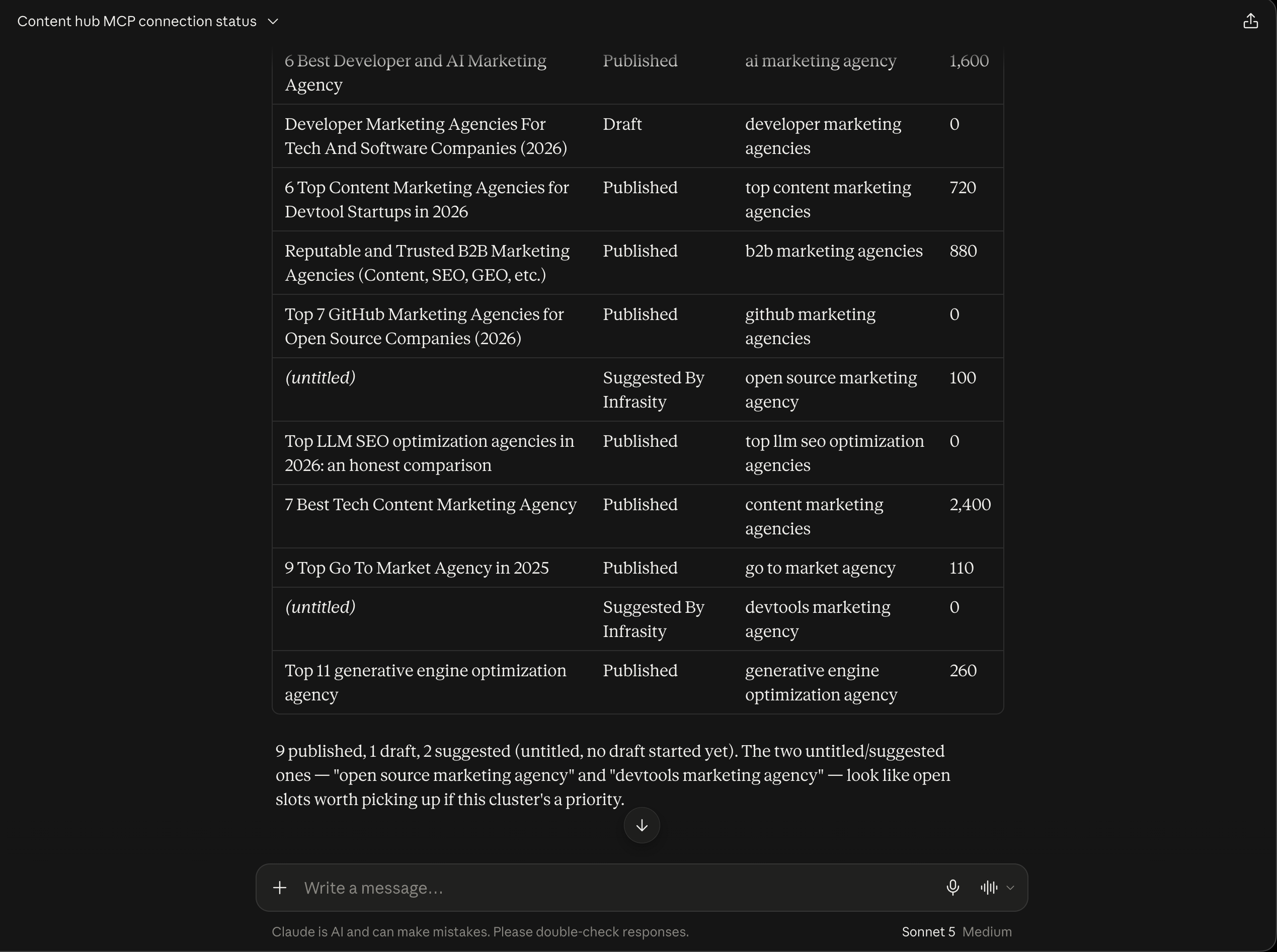
The full table for Developer Marketing Agencies covers 11 topics, from "7 Best Tech Content Marketing Agency" (2,400 MSV) and "6 Best Developer and AI Marketing Agency" (1,600 MSV) down to several published pieces with no recorded volume at all. Claude closes with a status breakdown so you don't have to count rows yourself: 9 published, 1 draft, and 2 suggested topics that have no title or draft yet. It also points out that those two suggested slots, "open source marketing agency" and "devtools marketing agency," look like open opportunities if this cluster is a priority.
Ask for takeaways
With the whole topic list already in the conversation, ask Claude to read into it, for example:
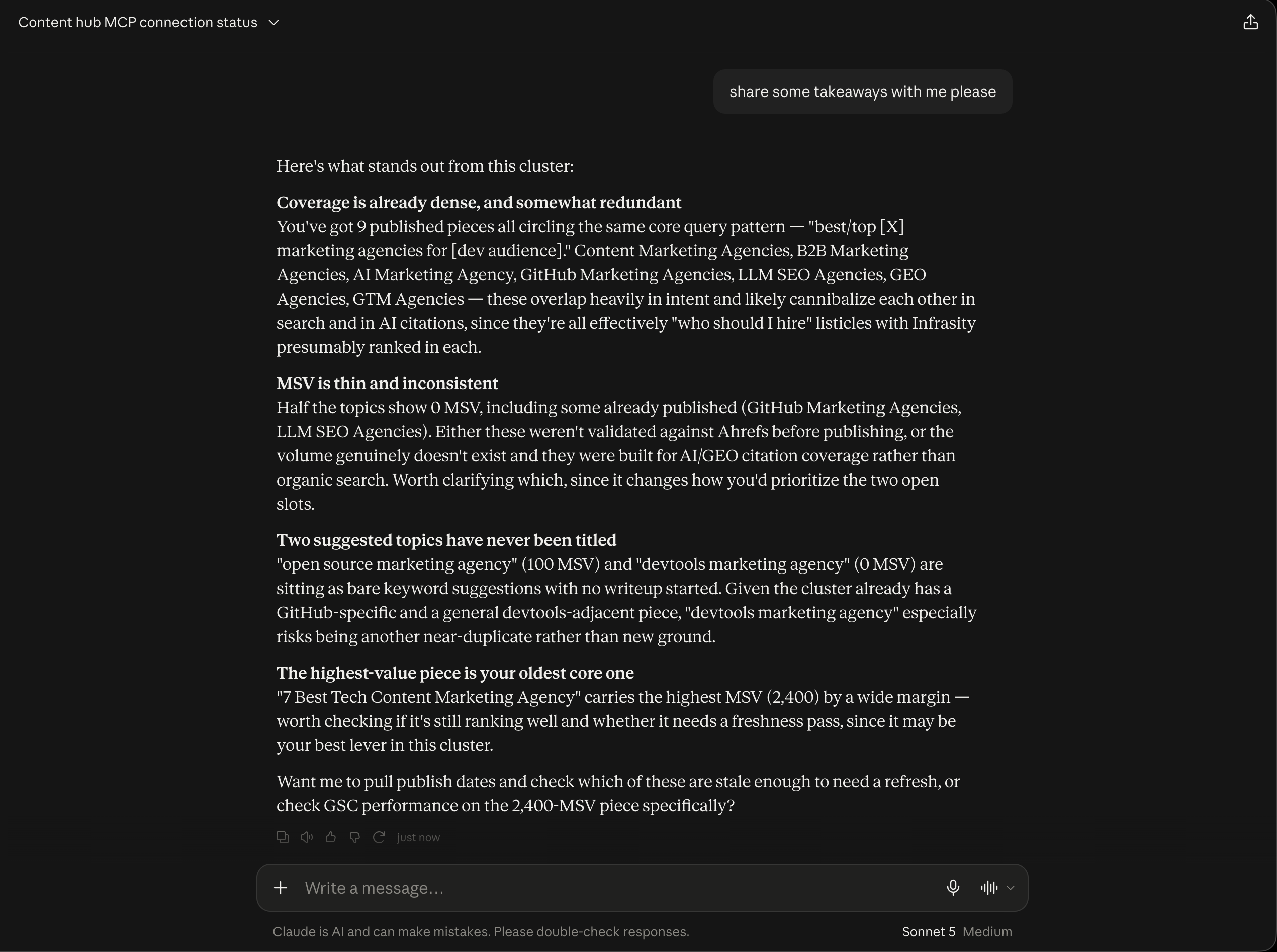
"share some takeaways with me please"
Claude returns four findings, each one something you'd only catch by looking at the cluster as a whole rather than one topic at a time:
- Coverage is dense, and somewhat redundant. The 9 published pieces all circle the same "best/top [X] marketing agencies for developers" pattern, so they overlap heavily in intent and likely compete with each other, in search and in AI citations.
- MSV is thin and inconsistent. Half the topics show 0 MSV, including some already published. Either they weren't validated against keyword data before publishing, or the volume genuinely doesn't exist and they were built for AI citation coverage instead, which changes how you'd prioritize the open slots.
- Two suggested topics have never been titled. Neither has a writeup started, and "devtools marketing agency" in particular risks being another near-duplicate of pieces the cluster already has.
- The highest-value piece is the oldest core one. "7 Best Tech Content Marketing Agency" carries the highest MSV by a wide margin, so it's worth checking whether it still ranks well and needs a freshness pass.
Claude then offers a natural next step: pulling publish dates to find which pieces are stale enough to refresh, or checking Search Console performance on the highest-volume piece.
Cluster mapping is most useful as a recurring check rather than a one-off: run it before planning each sprint, and the thin clusters and unmapped topics tell you where the next round of topics should go.
Head to app.infrasity.com and pull the cluster mapping for your own org to see which clusters are carrying your content and which are barely started.
How to Create a GEO Cluster, Add Prompts, and Track Citations via MCP
Create a new GEO cluster, populate it with prompts either directly or by scanning your site, and read the resulting citation and visibility data, all from a Claude Desktop chat over Content Hub MCP.
How to Track AI Share of Voice Across LLMs Using Content Hub MCP
Pull AI share of voice data for any GEO cluster straight into a Claude Desktop chat, then have Claude turn it into a prioritized content plan.