

TL;DR
Vector databases do not automatically improve documentation because they index whatever text you give them. If the underlying docs mix multiple tasks, reuse vague terms like “manage users,” or separate examples from explanations, the embedding model stores those ambiguities as-is, and the search results become noisy or misleading.
Most API documentation fails at semantic search because it is written for humans, not for retrieval systems. For example, a page titled “User Management” might describe creating users, updating roles, and listing accounts all in one place. When embedded, this becomes a single vector cluster, making it impossible for the search engine to distinguish between “create user” and “update user role.”
- Semantic search only works well when documentation behaves like structured data. That means one endpoint per chunk, a clear verb-first task description like “Create User,” inline request and response examples placed next to the description, and consistent terminology across sections. These predictable patterns allow the embedding model to create distinct and high-quality vectors.
Once documentation is structured in this predictable, machine-friendly way, semantic search becomes a practical upgrade for developer onboarding. Queries like “How do I authenticate?” or “How do I block access?” map reliably to the correct endpoint because the chunks reflect clear actions and isolated responsibilities.
A semantic search system works reliably only when documentation is structured around clear endpoints, explicit tasks, and inline examples rather than long prose. Vector search does not improve unclear documentation; it simply exposes whether the documentation was engineered with retrieval in mind.
How Poor Search Slows Down Developers and Increases Support Load
Most documentation sites still rely on keyword-based search. These systems are designed to match exact text, not intent. This works fine for prose-heavy content, but it breaks down quickly for technical documentation where developers describe problems differently than the internal names used by engineering teams.
Consider a simple case:
A backend team names an endpoint POST /terminate_instance, but developers in the real world think in terms like “stop container”, “shut down environment”, or “kill process.”
A keyword search engine treats each of these as unrelated strings. Unless the documentation contains the exact word stop, the search returns nothing , even though the feature exists.
This disconnect directly affects Developer Experience. When a developer cannot find what they need within a few minutes, they assume the product does not support the task. At that point, they either file a support ticket or abandon the integration entirely. Both outcomes slow down adoption.
Traditional search fails not because developers phrase queries poorly, but because the documentation structure and search engine don’t understand intent. This gap is the foundation for the shift toward semantic search — but as we will explore later, semantic search only works correctly when the documentation itself is engineered in a predictable, structured way.
Why Developer Queries Rarely Match API Terminology
Developers usually think in terms of actions, while APIs are named using internal system vocabulary. That gap shows up immediately in search. People ask what they want to do, not what the endpoint is called.
A common example in cloud or container platforms is stopping a running workload. A developer naturally searches for “How do I stop a container?”, but the API exposes this as POST /terminate_instance. The action is the same, but the words do not overlap.
Keyword search fails here because it only matches exact terms. Since “stop” never appears in the documentation, the search returns nothing. The developer assumes the feature does not exist, gets blocked during integration, and loses time looking elsewhere.
This is where semantic search becomes useful for product documentation. By using embeddings and a vector database, the system can map intent-driven queries like “add item” or “stop container” to the correct endpoint, even when the wording differs from what appears in the OpenAPI spec.
Tired of wasting engineering time on content?
What Is a Vector Database and How Does It Enable Semantic Search
Most engineers are used to retrieval systems that rely on exact matches. In SQL or document stores, you query by a key or a string and get back the rows that match it. That approach works for structured data, but it falls apart in documentation because developers rarely phrase questions the same way the docs are written.
In API docs, this mismatch is common. A user might search for “stop container” while the documentation describes the same action as “terminate instance.” Keyword search treats these as different things, even though they refer to the same operation.
A vector database handles this differently. Instead of storing raw text, it stores vectors generated by an embedding model. Each endpoint description, guide, or example is converted into a numerical representation that captures what the text is about. Content that describes the same task ends up close together in vector space, even when the wording is different.
This is what makes semantic search possible in documentation. Queries are matched based on intent rather than exact terms, so natural-language questions can still return the correct endpoint or example. This pattern is used in intent-based search bars, documentation assistants, and internal support tools where users describe problems in their own words.
Once documentation is broken into clear, task-focused units, a vector database makes it searchable in a way traditional systems cannot. Developers can query the docs directly and reach the right section without translating their intent into internal terminology or reading pages end to end.
Embeddings: How Text Becomes Numbers
When developers search documentation, they think in terms of tasks, not internal API names. Someone might search for “stop container” even though the API calls that action “terminate instance.” Keyword search breaks here because the words do not match. Semantic search fixes this by comparing intent instead of text.
Embeddings are what make that possible. An embedding model converts each documentation chunk into a numeric vector that represents what the chunk is trying to do. It does not care about variable names or exact phrasing. If two chunks describe the same operation, their vectors end up close to each other even when the wording differs.
This only works when the documentation is structured cleanly. A chunk that represents one task, such as authenticating a user or creating a resource, produces a clear intent signal. If the chunk mixes multiple actions or separates the example from the explanation, the embedding becomes ambiguous and retrieval quality drops.
When documentation is written with one task per chunk, consistent language, and examples placed next to the description, embeddings become reliable. Queries like “block access” can then match firewall rule documentation even without shared keywords, because the system is matching intent rather than strings.
Here is a minimal Python example showing how a documentation snippet becomes a vector:
from sentence_transformers import SentenceTransformer

# Load the model once
model = SentenceTransformer('all-MiniLM-L6-v2')

# A realistic documentation chunk (endpoint + description + example)
doc_chunk = """
Endpoint: POST /terminate_instance
Summary: Stop a running container
Description: This endpoint immediately terminates a container to prevent unnecessary compute billing.
Example:
curl -X POST https://api.example.com/terminate_instance \\
     -H "Authorization: Bearer <token>"
"""

# Convert the entire chunk into a vector
vector = model.encode(doc_chunk)

# Show the first few numbers to illustrate the output format
print(vector[:5])
How Different Types of Data Become Vectors
The same idea applies across modalities. Images, text, and audio are all translated into vectors, which can then be used for different tasks depending on the model:
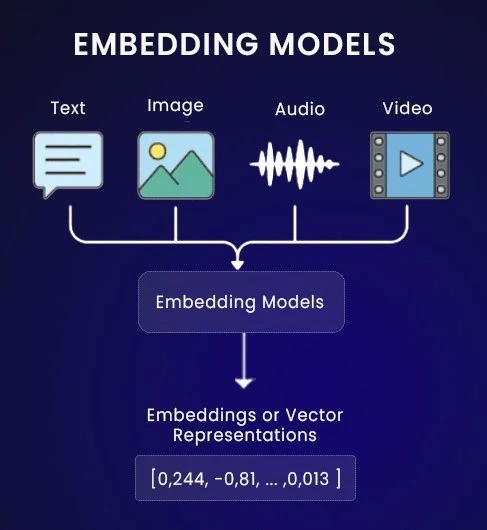
This diagram captures the general workflow:
- An image transformer produces vectors that help with tasks like object recognition
- An NLP transformer produces vectors used for question answering and semantic search
- An audio transformer produces vectors helpful for speech-to-text or anomaly detection
The typical pattern is that unstructured data is converted into a structured numerical form, making similarity search possible.
In the context of API documentation, this means the system is no longer comparing raw strings. It is comparing coordinates in a space where meaning is preserved, allowing it to return relevant results even when the wording differs.
Why Documentation Structure Directly Affects Embedding Quality
Embedding models perform best when each chunk of text represents one clear task. In API documentation, this is often not the case. Endpoint names, side notes, and loosely related behavior are frequently mixed together, which makes it hard for the model to understand what the text is actually about.
Well structured chunks usually map to a single action such as creating a project, authenticating a user, or updating an address. When a chunk is built around one task, the resulting vector captures that intent cleanly. Queries that express the same intent tend to land close to it during retrieval.
Problems appear when multiple actions are combined in one place. If a chunk describes updating a user, resetting a password, and fetching details together, the embedding represents all of those at once. A search for any one task can then return an imprecise result.
Examples also play an important role. When request examples sit next to the explanation, the embedding includes both intent and usage. That extra context makes similarity search more stable and helps the system return the correct endpoint even when the query uses different wording.
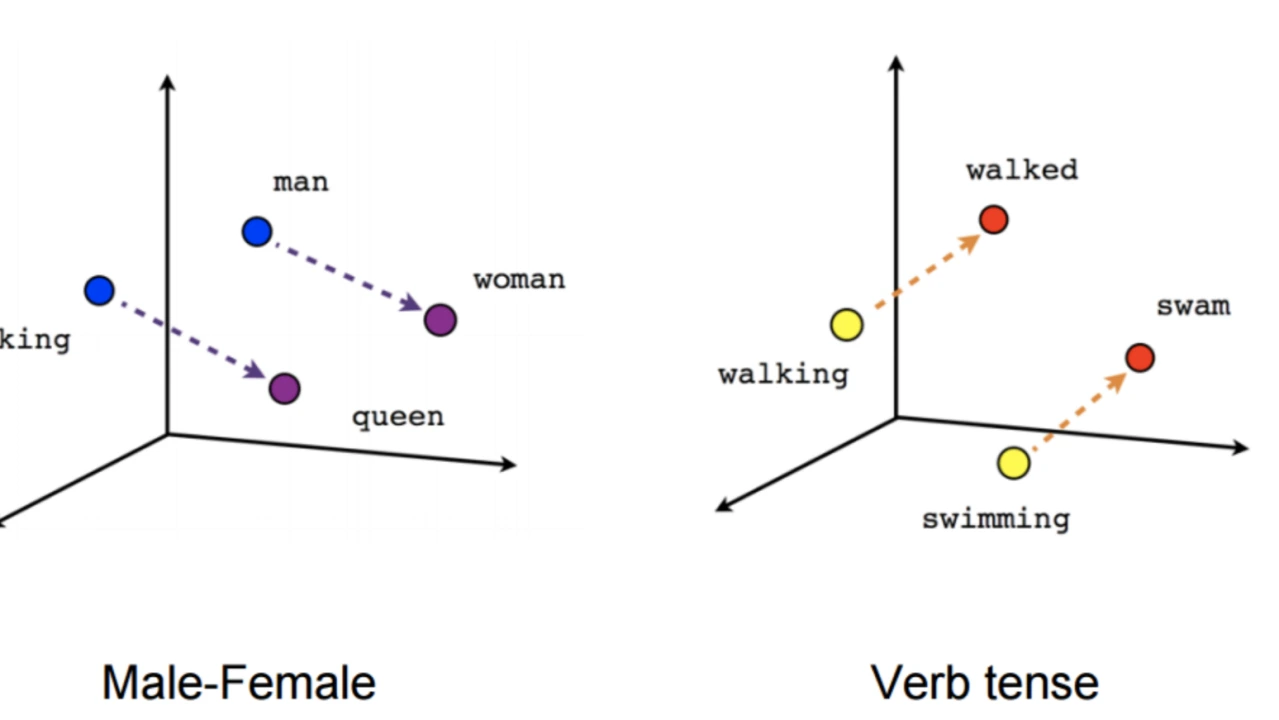
This diagram illustrates the idea. Words that describe stopping or ending a process form a cluster in one region of the space, while unrelated actions such as create are placed farther away.
How the system retrieves results
When a developer submits a question, the system does not look for literal words. It converts the question into a vector and asks a different kind of query:
Which stored vector sits closest to this one in meaning
If the query is “kill app,” the resulting vector lies near the documentation vector for the endpoint POST /terminate_instance. Both describe the same operational intent, so the retrieval step selects that chunk as the most relevant match.
This shift from matching text to matching meaning reduces frustration and helps developers find the correct information even when they do not know the exact vocabulary used in your API documentation.
How to Prepare Documentation for Vector Search
Before adding embeddings or vector databases, documentation must be organized in a way that machines can reliably interpret.
Think of the difference:
Previously: Documentation Written for Reading, Not Retrieval
Older documentation styles are optimized for human scanning, but they bundle too many ideas together for an embedding model. This makes it difficult for a vector system to understand what the text is actually about.
Typical issues:
1. Multiple tasks in a single section
A single page describes “Create User”, “Delete User”, and “Reset Password”, all mixed under “User Management”.
Result: the vector represents all three tasks at once.
2. Examples live far away from the explanation
The page describes a concept at the top and puts the curl command 300 lines below.
Result: the embedding captures the description but not the usage pattern.
3. Terminology drifts across sections
One part of the docs says “stop container”, another says “terminate instance”.
Result: retrieval becomes unstable because the model sees inconsistent phrasing for the same action.
What Works Better: Documentation Structured Around Tasks
When documentation is written with consistent boundaries, embeddings become far more precise. Each chunk now expresses a single intent, which is exactly what the vector model needs.
Characteristics of well structured documentation:
1. One endpoint per unit
Example:
POST /api/v1/containers/stop
This section covers only stopping a container.
2. One task explained clearly
Example:
“This endpoint stops a running container to prevent unnecessary resource usage.”
3. Example placed next to the explanation
Example:
curl -X POST https://api.example.com/containers/stop -d '{ "id": "abc123" }'4. Terminology stays consistent
If the task is “stop container,” the description and examples also say “stop,” not “halt,” “kill,” or “terminate,” unless aliases are explicitly documented.
Before implementing semantic search, the documentation needs to be converted into a format that a vector model can work with. The next steps outline how raw files are read, normalized, split into meaningful units, and finally embedded. Each step matters because errors made early in the pipeline propagate into poor retrieval quality later.
Step 1: Reading and Normalizing Source Files
The first step is simply loading the source documentation in a consistent format. Most technical teams maintain:
- openapi.json for API definitions
- Markdown files for guides, reference pages, and examples
The ingestion stage gathers all of these into a uniform internal format. This step does not interpret meaning; it simply standardizes the input so that the rest of the pipeline can operate reliably.
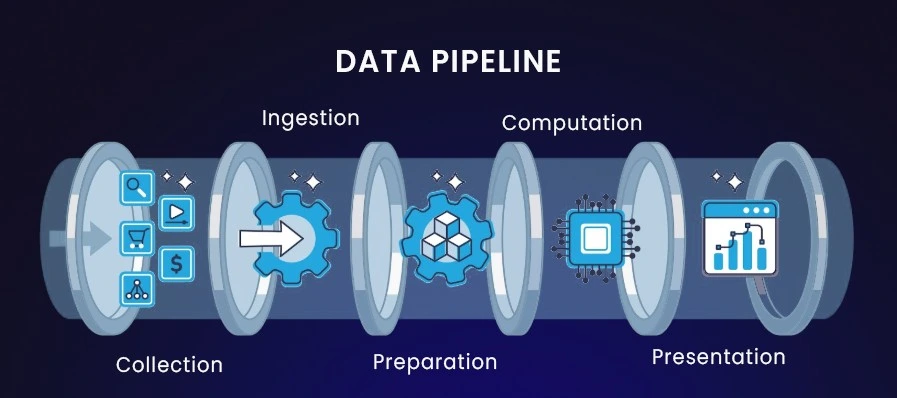
Ingestion is the stage where raw documentation files are converted into a consistent structure that the system can work with. This matters because documentation often arrives in mixed formats. Some teams keep endpoint definitions in an OpenAPI file, others keep examples in Markdown, and older sections may be written in prose-heavy style. Before any chunking or embedding can occur, the system must extract meaningful units that represent developer tasks.
Examples of what ingestion typically identifies from real documentation:
- A GET /users endpoint definition that appears in the OpenAPI spec but is missing a usage example
- A Markdown page that explains authentication but places the curl example three sections lower
- An object schema described in prose rather than JSON, requiring normalization before embedding
- A section where multiple unrelated tasks (“reset password”, “update profile”, “delete account”) are written under the same heading
Ingestion’s job is to convert these inconsistencies into a uniform format so the next step, chunking, can isolate clean, task-level units that embeddings can represent accurately.
Step 2: Chunking (Why Structure Shapes the Entire Search Quality)
Chunking defines what the embedding model actually understands. The model does not know about pages, headings, or layout. It only sees the text inside each chunk. If a chunk mixes unrelated ideas or splits an explanation from its example, the meaning becomes unclear and retrieval suffers.
A common mistake is using fixed size splits that cut text every few hundred characters. This approach fails for API documentation because it often separates an endpoint from its parameters or breaks examples in half. When the model sees incomplete context, it cannot reliably learn what the endpoint does.
A more reliable strategy is chunking by semantic boundaries. In API docs, that boundary is usually the endpoint itself. Keeping the endpoint name, task description, parameters, and example together gives the model a complete unit of meaning to work with.
You can think of it like a dictionary. Tearing a page at random gives you fragments of definitions that are hard to use. Keeping a full entry together preserves the meaning. In OpenAPI terms, this means treating everything under a single path like /users/login as one chunk. When documentation follows this structure, embeddings become clear, and search results become predictable.
Step 3: Embedding (Turning Documentation Into Coordinates)
Once documentation is chunked, each chunk is converted into a vector so it can be indexed and compared. This step is called embedding. The model reads the text and produces a list of numbers that represent what the chunk is about, not the exact words it uses.
Chunks that describe similar tasks end up close to each other in this space. A login endpoint and a token refresh endpoint, for example, are positioned nearby because both describe authentication workflows. An unrelated chunk, such as billing or reporting, lands much farther away.
This only works when each chunk expresses a single, clear task. If a chunk mixes multiple concepts, the model cannot place it cleanly, and retrieval becomes unreliable. Clear structure at the documentation level directly determines how accurate these embeddings are.
Here is a simple example of generating an embedding in Python:
from sentence_transformers import SentenceTransformer

model = SentenceTransformer('all-MiniLM-L6-v2')

doc = "POST /terminate_instance: Stops the running container immediately."

vector = model.encode(doc)
print(vector[:5])
Once embedded, your documentation is no longer text in the traditional sense. It becomes a set of coordinates that can be compared mathematically. This is what makes semantic search possible.
Step 4: Indexing (Giving Structure a Place to Live)
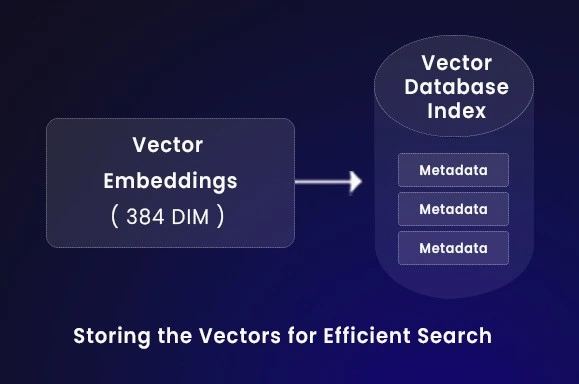
Once every chunk has been converted into a vector, you need a system that can store these vectors and retrieve them quickly. This is the role of a vector database. It is built for similarity based lookups, where the goal is not to find an exact match but to find the closest piece of information based on meaning.
You can think of indexing as building an internal map of your documentation. Instead of alphabetical sorting or table based filtering, the vector database groups related concepts together because they sit close to each other in the vector space. For example, descriptions about authentication endpoints tend to cluster naturally, even if the wording differs across sections. The same happens for topics like rate limiting or pagination.
This is why earlier steps matter so much. If a chunk mixes unrelated ideas, the resulting vector will not fit neatly into any group, and retrieval accuracy will suffer. Good documentation structure produces clean clusters, while poorly structured content produces noise.
Step 5: Search (Retrieving the Right Answer, Not the Right Word)
When a user asks a question, the system does not scan the docs for matching words. It converts the query into a vector and compares it against vectors stored in the database, returning the closest match based on semantic similarity.
For example, if someone asks, “How do I authenticate?”, the system does not look for the word authenticate. The embedding model represents the intent of the question, and the vector database finds the documentation chunk that expresses the same intent, usually the login or token endpoint, even if those exact words never appeared in the query.
This only works when the documentation is structured cleanly. If an endpoint mixes multiple tasks or separates examples from explanations, the retrieved result becomes fuzzy. When each chunk represents one clear task with its example, nearest-neighbor search reliably returns what the developer is actually looking for.
Building a Semantic Search System for API Documentation
This section explains how each part of the system works end to end:
how documentation is turned into structured chunks, encoded into vectors, indexed in a vector database, retrieved through FastAPI, and finally used for RAG-style answer generation.
Everything here assumes that the documentation has already been written in a structure that supports retrieval (single task per chunk, inline examples, consistent terminology).
Prerequisites
We use lightweight, widely adopted tools so the system is affordable and easy to run during development:
pip install fastapi uvicorn sentence-transformers pinecone-client numpyStep 1: Turning Documentation Into Structured Chunks
Purpose of this step
Vector search only works when documentation is broken into clean, task-level chunks. If one chunk contains three unrelated endpoints or if examples live on separate pages, embeddings become noisy and retrieval becomes inconsistent.
So this first step ensures that every chunk represents a single actionable task with:
- one endpoint
- one task name
- one description
- one runnable example
- one stable documentation URL
Intelligent Chunking (Parsing API Specs Into Meaningful Units)
Below is a clean example of how to process an API spec into chunkable objects.
Notice how the code reads like something a real developer would maintain—minimal comments, practical naming, and specific purpose.
import json

# Example API spec (normally loaded from openapi.json)
api_spec = [
    {
        "endpoint": "POST /api/v1/auth/login",
        "summary": "User Login",
        "description": "Authenticates a user and returns a JWT token. Requires email and password.",
        "code_snippet": """curl -X POST https://api.saas.com/login \\
-d '{"email":"user@example.com","password":"secure123"}'"""
    },
    {
        "endpoint": "GET /api/v1/users/me",
        "summary": "Get Current User",
        "description": "Returns details for the authenticated user.",
        "code_snippet": """curl -H 'Authorization: Bearer <token>' \\
https://api.saas.com/users/me"""
    }
]

def intelligent_chunker(spec):
    """
    Produces task-level chunks (one endpoint = one chunk).
    This keeps the intent, description, and example together.
    """
    chunks = []
    for item in spec:
        text = (
            f"Endpoint: {item['endpoint']} | "
            f"Task: {item['summary']} | "
            f"Details: {item['description']} | "
            f"Code: {item['code_snippet']}"
        )

        chunks.append({
            "id": item["endpoint"],
            "text": text,
            "metadata": {
                "url": f"https://docs.saas.com/reference#{item['summary'].replace(' ', '-')}"
            }
        })
    return chunks

processed_docs = intelligent_chunker(api_spec)
print("Semantic chunks:", len(processed_docs))
print("Sample:", processed_docs[0]["text"][:120], "...")
Why Many API Docs Break Semantic Search
Embedding models work by clustering texts that describe similar actions, even if the wording is different. For example, “stop container” and “terminate instance” land close together because the model has seen both phrases used in the same operational context. This is why embeddings capture task intent instead of relying on matching specific keywords. If documentation is written loosely, embeddings become ambiguous.
Here are the failure patterns I’ve personally seen while building semantic search for engineering teams:
Common issues
- Titles that describe categories instead of actions
“User Management” instead of “Create User” - Examples stored separately from endpoint definitions
- Inconsistent naming (e.g., “remove user” in one place, “delete user” in another)
- Parameter lists that do not appear next to examples
Marketing-style descriptions instead of operational behavior
A bad doc chunk (easy to index, impossible to retrieve well)
Title: User Management
We support several user operations. Use the admin console or automation tools.
Examples are in the sample repo. Parameters: id, role, status.
Problems with above chunk:
- The chunk has no actionable intent
- The example is not present
- The verbs do not describe what the API actually does
A good, retrieval-friendly chunk
Endpoint: POST /api/v1/users
Task: Create userDetails: Creates a new user. Requires: email, password, role.Example:curl -X POST https://api.example.com/api/v1/users \\\-d '{"email":"user@example.com","password":"x"}'
URL: https://docs.example.com/reference#create-user
This kind of structure produces clean embeddings, reliable nearest-neighbor matches, and predictable RAG behavior.
Step 2: Converting Chunks Into Embeddings
Purpose of this step
Embedding works best when each documentation chunk represents a single task. If one block mixes actions like “create user” and “list users,” the vector becomes ambiguous and retrieval quality drops. Keeping the endpoint description and its example together gives the model a clear signal about what the endpoint actually does.
Semantic similarity works only if:
- each chunk has a single intent, and
- examples are placed in the same chunk as the description.
The model isn't “understanding English”-it is mapping similar tasks to nearby coordinates.
For example:
“stop container” and “terminate instance” → end up close together
even though these strings share no keywords.
Embedding the chunks
This part converts every documentation chunk into an embedding that the vector database can later search. The model reads the full chunk-endpoint, description, example,and produces a 384-dimensional vector that represents its meaning. Each vector is stored along with its ID and metadata so it can be retrieved and linked back to the original documentation page.
from sentence_transformers import SentenceTransformer

# Cached locally; no API cost
model = SentenceTransformer("all-MiniLM-L6-v2")

def generate_vectors(chunks):
    """
    Converts each chunk into a vector (list of floats).
    Shape: 384 dimensions for MiniLM.
    """
    vectors = []
    for chunk in chunks:
        embedding = model.encode(chunk["text"]).tolist()
        vectors.append({
            "id": chunk["id"],
            "values": embedding,
            "metadata": chunk["metadata"]
        })
    return vectors

vector_data = generate_vectors(processed_docs)
print("Vectors:", len(vector_data))
print("Dimensions:", len(vector_data[0]["values"]))
Now each endpoint behaves like a point in semantic space. When a user asks something like “reset password,” we can embed that query using the same model and quickly compare it to all stored vectors. The closest vector represents the documentation chunk whose meaning is most similar to what the user asked.
Step 3: Indexing Embeddings in a Vector Database
Purpose of this step
A vector database gives the embedding model something efficient to search against. It stores each documentation chunk as an (id, vector, metadata) record and can quickly return the vectors closest to a user’s query, often in just a few milliseconds. Whether you use Pinecone, Weaviate, ChromaDB, or FAISS, the core idea is the same: fast lookup based on semantic similarity rather than keyword matching.
The snippet below sets up a Pinecone index and uploads your documentation vectors to it.
First, it checks whether an index named "api-docs-search" already exists. If not, it creates one with the correct embedding dimensions (384) and cosine similarity as the distance metric. After the index is ready, it connects to it and uploads (upsert) all the vectors generated earlier.
In short, this is the step where your processed documentation becomes queryable by semantic search.
from pinecone import Pinecone, ServerlessSpec

pc = Pinecone(api_key="YOUR_PINECONE_API_KEY")
index_name = "api-docs-search"

if index_name not in pc.list_indexes().names():
    pc.create_index(
        name=index_name,
        dimension=384,
        metric="cosine",
        spec=ServerlessSpec(cloud="aws", region="us-east-1")
    )

index = pc.Index(index_name)

print("Uploading vectors...")
index.upsert(vectors=vector_data)
At this point, your vectors are stored in a high-performance index that supports fast similarity search. Any user query that you embed later can now be compared mathematically against these stored vectors, allowing the system to retrieve the documentation chunk that best matches the user’s intent.
Step 4: Building the Search API
Purpose of this step
This step exposes a small HTTP API that lets other systems search the documentation by intent. A web search box, CLI tool, or support bot can send a natural-language query and receive the most relevant documentation chunks in return.
By this point, the hard work is already done. The docs are chunked, embedded, and indexed. This layer simply wires those pieces together and makes them usable in a real application.
In practice, the flow is straightforward: the query is embedded using the same model as the docs, the vector database finds the closest matches, and the API returns those chunks with confidence scores and source URLs.
The script below defines a FastAPI /search endpoint that accepts a query and returns the most relevant documentation entries.
from fastapi import FastAPI, HTTPException
from pydantic import BaseModel
from sentence_transformers import SentenceTransformer
from pinecone import Pinecone

app = FastAPI(title="API Docs Search")

model = SentenceTransformer("all-MiniLM-L6-v2")
pc = Pinecone(api_key="YOUR_PINECONE_API_KEY")
index = pc.Index("api-docs-search")

class SearchRequest(BaseModel):
    query: str
    top_k: int = 3

@app.post("/search")
async def search_docs(request: SearchRequest):
    try:
        query_vec = model.encode(request.query).tolist()

        results = index.query(
            vector=query_vec,
            top_k=request.top_k,
            include_metadata=True
        )

        formatted = [{
            "score": m["score"],
            "content": m["metadata"]["text"],
            "url": m["metadata"]["url"]
        } for m in results["matches"]]

        return {"results": formatted}
    except Exception as e:
        raise HTTPException(status_code=500, detail=str(e))
After this step, your documentation is no longer just indexed data. It becomes a searchable service that understands intent. A developer can ask “how do I authenticate” and receive the correct endpoint and example, even if those exact words never appear in the documentation.
Step 5: Using Retrieval for AI-Generated Answers (RAG)
Purpose of this step
earch helps users find the right part of the documentation, but it still leaves them to scan paragraphs and assemble the answer themselves. In real integrations, developers usually want a direct response that already includes the relevant steps or code.
This step takes the documentation chunks returned by vector search and passes them to a language model to produce a short, readable answer. The constraint is strict: the model can only use the retrieved chunks. If the answer is not present there, it must say so instead of guessing.
This is the safe way teams use LLMs with documentation. Retrieval controls what the model is allowed to see, and generation turns that approved content into a concise explanation.
The function below accepts a user question and the documentation chunks returned by search. It builds a prompt that limits the model’s response to those chunks only, ensuring answers are grounded in the actual documentation rather than inferred behavior.
from openai import OpenAI

client = OpenAI(api_key="YOUR_OPENAI_API_KEY")

def generate_answer(user_query, chunks):
    context = "\n\n".join([c["content"] for c in chunks])

    system_prompt = f"""
You are a technical support engineer.
Use only the following documentation excerpts to answer.If the answer is not present, say:
"I don't have enough information in the docs."

Context:
{context}
"""

    response = client.chat.completions.create(
        model="gpt-4o-mini",
        temperature=0,
        messages=[
            {"role": "system", "content": system_prompt},
            {"role": "user", "content": user_query}
        ]
    )

    return response.choices[0].message.content
Step 6: Full Chat Endpoint (Retrieval + Generation)
Purpose of this step
This endpoint ties everything together into a single workflow. Instead of calling search and generation separately, the user sends one request and receives both an answer and the sources it came from.
From a product perspective, this is what powers documentation chat interfaces and in-product help widgets. From an engineering perspective, it is simply orchestration: retrieve relevant docs first, then generate an answer from them.
@app.post("/chat")
async def chat_with_docs(request: SearchRequest):
    try:
        qvec = model.encode(request.query).tolist()

        search = index.query(
            vector=qvec,
            top_k=3,
            include_metadata=True
        )

        chunks = [{
            "content": m["metadata"]["text"],
            "url": m["metadata"]["url"]
        } for m in search["matches"]]

        answer = generate_answer(request.query, chunks)
        return {
            "answer": answer,
            "sources": [c["url"] for c in chunks]
        }
    except Exception as e:
        raise HTTPException(status_code=500, detail=str(e))
At this point, the system is no longer just a search engine. It is a documentation interface that can answer questions directly while remaining grounded in real, verifiable content. The quality of the answers still depends entirely on how well the documentation was structured upstream, which is exactly why content engineering matters.
What the User Actually Experiences
User asks:
“How do I authenticate?”
At this moment, the user is not thinking about endpoint names or auth flows. They are stuck mid-integration and want the fastest way to make a request that actually works.
Query handling:
The system converts the question into an embedding using the same model used during indexing. Because each endpoint in the docs represents a single task with consistent naming, the embedding cleanly captures the intent: authenticate a user and obtain credentials.
Retrieval:
The vector database looks for documentation chunks with the same intent and returns the login endpoint, API key usage, and any relevant OAuth flow. Each result already includes the endpoint path, required parameters, and an inline example because the docs were written as self-contained units.
Answer generation:
The language model only sees these retrieved chunks. It does not invent steps or guess parameters. It summarizes what is already documented and selects the example that actually performs authentication.
What the user sees:
A direct answer explaining which endpoint to call, what credentials are required, and a runnable curl command taken straight from the docs, with links to the exact reference pages used.
Why this works:
The system works because the documentation was written for retrieval. Clear task boundaries, stable terminology, and inline examples make embeddings precise. The vector database simply makes that structure searchable by intent.
Impact:
Developers reach a working request faster without translating their problem into internal naming. Support teams see fewer basic questions. Documentation stops being a passive reference and starts functioning as part of the product interface.
The Result: What Better Retrieval Actually Enables
Developers often describe their problem in natural language, not in the exact terms your API documentation uses. This creates a consistent gap between what a developer searches for and how your product names its features. A retrieval system based on vectors helps close this gap, but only when the underlying documentation is written in a way that clearly expresses intent, tasks, and examples inside each endpoint description.
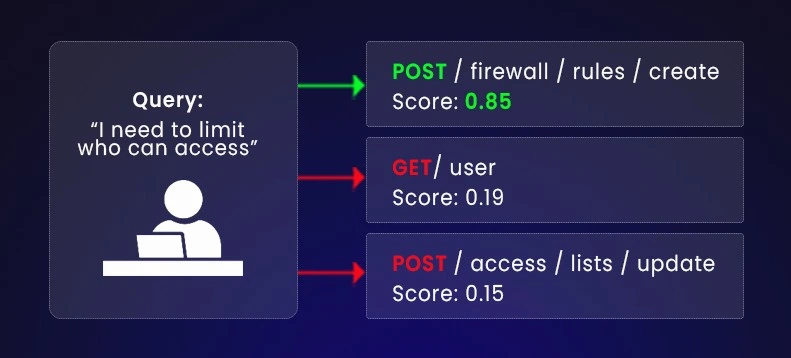
A useful way to see this is through a real scenario. Imagine a developer integrating your API through a Terraform provider. They want to control access to a server, but they do not know that your product uses the term “firewall rule” for that operation.
User Query:
"I need to limit who can access the server."
What happens with traditional search
If the documentation is searched using keywords, the system looks for the literal strings “limit” or “who can access.” If your documentation describes the feature only under “Create Firewall Rule,” traditional search returns helpful nothing. The developer concludes that the API cannot help them and moves on.
What happens when documentation is structured correctly and indexed as vectors
A vector search engine converts the query into a numerical representation and compares it with the representations of each endpoint. Because “limit access” and “firewall rule” often appear in similar technical contexts, their vector positions end up close together.
If your documentation has been written with clear task summaries, consistent terminology, and an inline example, the corresponding vector is strong and easy to retrieve.
Vector Match example:
- Endpoint: POST /firewall/rules/create
- Similarity Score: 0.85
Even though the user never typed “firewall,” the system identifies the correct endpoint because the documentation chunk contains the task, the summary and the example directly attached to the endpoint.
JSON Response Example
{
  "query_analysis": {
    "original_query": "I need to limit who can access the server.",
    "detected_intent": "security_restriction"
  },
  "search_results": [
    {
      "rank": 1,
      "score": 0.85,
      "endpoint": "POST /firewall/rules/create",
      "summary": "Create Firewall Rule",
      "reasoning": "This endpoint allows you to restrict inbound traffic based on IP addresses, which matches the intent 'limit access'."
    },
    {
      "rank": 2,
      "score": 0.78,
      "endpoint": "POST /access/lists/update",
      "summary": "Update Access Control List (ACL)",
      "reasoning": "ACLs are another method for controlling server access."
    }
  ]
}
Why this example matters for your documentation strategy
The developer receives the correct answer without knowing your internal vocabulary. This reduces onboarding time and avoids support questions like “Does your API support IP restrictions?”
But the example also demonstrates something more important for your article’s argument:
Vector search works only when documentation is structured in a stable, predictable way.
If the endpoint description was vague, missing a task summary or separated from its example, the retrieval quality would drop, even with a powerful vector database.
Advanced Practices for Production Use
Once the basic semantic search pipeline works, a few issues start showing up in real API documentation. These refinements help teams avoid the common failure modes.
1. Hybrid Search when intent and exact values mix
Vector search works well when users ask conceptual questions like “How do I authenticate,” but it struggles with literal strings.
- Why it fails: A model sees “ERR 503” and “ERR 502” as similar because both describe server problems, even though the developer wants the exact code.
- How teams fix it: Run vector search and keyword search together. Keyword search handles exact tokens (error codes, IDs), while vector search handles intent.
- Example: A query for “ERR 503” should return the specific status page, not a general “Server Error” guide.
2. Drift detection to keep answers aligned with the product
Documentation and code rarely evolve at the same pace.
- Why this matters: If your API removed a field last week but your doc chunks still reference it, the search engine will confidently return outdated information.
- How teams fix it: Re index docs automatically after every merged documentation update.
- Example: When the “role” field is renamed to “user role,” the embedding for the old description should be removed immediately, or the LLM will keep returning stale examples.
3. Re-ranking to clean up noisy retrieval
Fast embedding models are good at narrowing down options but not perfect at ordering them.
- Where this breaks: The top vector match might be loosely related, while a better match sits at rank 4 or 5.
- How teams fix it: Take the top 10 results from the vector database, then pass them through a cross encoder that reads the full text and re orders them accurately.
- Example: A query like “reset password flow” might initially surface “create user” because they share vocabulary, but after re ranking, “request password reset” correctly becomes the top result.
Here is the Conclusion, wrapping everything up with the final "Infrasity" stamp of authority.
Every devtool startup needs content. Most do it wrong.
Conclusion
Engineering teams adopt vector databases because they want better search, faster onboarding, and fewer support tickets. But the last sections of this tutorial should make one thing clear:
vector search does not magically fix unclear or inconsistently written documentation. It only amplifies what already exists.
If your docs are structured, task oriented, consistent in terminology, and grounded in real examples, then embeddings work beautifully. Queries like “limit who can access the server” reliably map to the correct endpoint, even if the user never uses your internal vocabulary.
But if your documentation mixes concepts, separates examples from endpoints, or uses vague descriptions, vector search will surface the same confusion back to the user. The quality of retrieval is a direct reflection of the quality of the source.
The real shift: treating documentation as data
What this pipeline shows is not just a technical upgrade; it is a change in how documentation is produced.
When docs behave like structured data:
- chunking becomes predictable
- embeddings become accurate
- retrieval becomes reliable
- RAG systems stop hallucinating
This structured approach is what allows semantic search to function reliably. When your documentation is broken into stable, well defined units, the embedding model can understand what each part represents.
How Documentation Search Impacts B2B Product Adoption
Clear and structured documentation directly affects product adoption:
- Developers find answers quickly instead of guessing terminology.
- Support teams receive fewer repetitive questions.
- Onboarding improves because users can ask natural language questions and still reach the correct endpoint.
- API integration times drop because examples live exactly where developers expect them.
These outcomes do not come from the vector database alone—they come from documentation that has been engineered to work well inside a vector database.
Where Infrasity Actually Fits In
Teams adopt semantic search or LLM assistants because developers prefer asking questions over scanning long documentation pages. These systems only work well when the documentation they rely on is structured cleanly enough for embeddings to interpret. That is the part Infrasity focuses on.
Infrasity specialises in product documentation crafted the same way engineering teams structure their code-clear boundaries, predictable organisation, and examples placed exactly where developers expect them. When documentation behaves like structured data instead of long-form prose, retrieval tools such as semantic search become far more reliable.
The documentation Infrasity produces supports tasks that developers repeatedly struggle with in typical API references. This includes:
- Stable endpoint descriptions that avoid ambiguous phrasing and map cleanly to actual implementation
- Task-oriented summaries that describe what the developer is trying to accomplish instead of repeating internal terminology
Inline examples that stay with the relevant endpoint, not hidden in separate pages or scattered across the reference
- Consistent naming and structure so that each page or section represents one coherent unit that can be embedded accurately
- Terminology that reflects how developers naturally describe problems, reducing friction between user intent and documentation language
When documentation follows this structure, embeddings capture precise intent, vector search becomes dependable, and AI assistants surface the correct endpoint without guessing. Infrasity’s contribution is not the vector tooling itself, but the engineering-grade documentation that allows those tools to perform at their best.
If You Want to Build This Search System Internally
Everything we described earlier - ingestion, chunking, embedding, storing, searching, summarising - is the semantic retrieval workflow teams use when they want developers to query their documentation instead of reading it top to bottom.
But every stage in this workflow only works if the documentation already follows predictable, engineering grade structure.
Below is how each step depends directly on documentation quality, with concrete examples:
Ingesting API specs
The tooling can only read what the spec actually contains.
If an OpenAPI file omits request bodies or hides required parameters inside prose, ingestion will succeed technically, but the system has nothing meaningful to index. For example, a POST /users route without a documented payload produces a chunk that answers no real developer question.
Chunking documentation
Chunking fails when one page mixes unrelated actions.
If a paragraph describes both “Create User” and “List Users”, embedding models receive two intents in the same block. The vector then sits between those meanings, and search may return the wrong endpoint even for a simple query like “create a user”.
Embedding text
Embeddings only work when the text contains specific signals.
A summary like “Handles user operations” provides no task level meaning. The vector produced from such text becomes blurry and will match every user related query, leading to low quality results.
Storing vectors
Vector databases assume each chunk follows consistent structure.
If one endpoint chunk contains examples, parameters, and constraints, but another only contains a summary line, both end up in the same index. Their vector shapes may be valid, but when compared, the scoring becomes uneven. Retrieval becomes unstable because the representation quality differs dramatically.
Searching the index
Search can only return what was embedded.
If an example sits five screens below the endpoint description, and your chunking logic never captured it, the nearest match will not include the example developers actually need. Retrieval looks “wrong”, but the root cause is structural, not algorithmic.
Summarizing answers
The LLM can only rewrite what was retrieved.
If a chunk lacks parameter details or constraints, the generated answer will also lack them. Developers then assume the LLM failed, even though the model simply had incomplete material to work with.
The core point
The correctness of this entire retrieval workflow depends on the quality and structure of the documentation you feed into it. If your team needs documentation designed specifically for search, AI assistance, and endpoint level retrieval, Infrasity works at exactly that intersection of writing, structure, and developer expectations.
Frequently Asked Questions (FAQs)
1. What is a vector database, and why is it used in a semantic search tutorial?
In a vector database tutorial, the goal is usually to show how text can be searched by meaning rather than exact words. A vector database is used because it can store embeddings and efficiently retrieve the closest matches based on similarity.
For example, in API documentation, a user might search for “stop container” while the actual endpoint is named /terminate_instance. A traditional database would fail because the words do not match. A vector database stores both pieces of text as embeddings, and because their meanings are similar, it can return the correct endpoint even when the wording differs.
This is why most semantic search tutorials rely on vector databases instead of SQL or keyword indexes.
2. When does a vector database make sense for API documentation?
A vector database is useful when you want developers to query documentation instead of browsing it manually. This typically shows up in tutorials that cover:
- semantic search inside API docs
- AI-powered documentation assistants
- internal developer support tools
- search across large OpenAPI specs
If your documentation is small and task names match user queries exactly, keyword search may be enough. Vector databases become valuable when documentation grows, terminology varies, or users describe tasks in their own words rather than using exact endpoint names.
3. Do I need Pinecone to follow a vector database tutorial?
No. Most vector database tutorials support multiple backends because the core concepts are the same.
You can choose based on your setup:
- Managed services like Pinecone or Weaviate Cloud are common in production tutorials because they handle scaling, indexing, and latency.
Open-source options such as FAISS or ChromaDB are often used in tutorials for local testing or learning because they run entirely on your machine.
The tutorial concepts remain the same regardless of which vector database you choose.
4. Why do many vector database tutorials fail on real documentation?
Most vector database tutorials assume the input text is already clean and well structured. In real API documentation, this is rarely true.
Common problems include:
- multiple endpoints described in a single section
- examples separated from endpoint descriptions
- vague summaries like “handles user operations”
- Inconsistent terminology across pages
When this content is embedded, the resulting vectors represent mixed or unclear intent. The vector database works correctly, but retrieval quality suffers because the documentation was not written to support semantic search.
This is why documentation structure is a critical part of any serious vector db tutorial for APIs.
5. How often should vectors be updated in a documentation search system?
In most vector database tutorials, indexing is shown as a one time step. In real systems, vectors must remain in sync with documentation changes.
A practical approach is:
- Re-embed documentation whenever API docs change
- trigger indexing when a docs pull request is merged
- Update vectors before new endpoints go live
This prevents search results from drifting and returning outdated examples or deprecated endpoints.
6. What embedding model works best in a vector db tutorial for technical docs?
For API documentation tutorials, embedding models are usually chosen based on speed, cost, and reliability.
Common choices include:
- all-MiniLM-L6-v2 for fast, local, zero cost embeddings
- OpenAI embedding models for higher accuracy on complex queries
Most tutorials start with MiniLM because it is easy to run locally and performs well for endpoint descriptions, task summaries, and code examples.