
TL;DR
- Bad documentation examples directly hinder adoption by interrupting the developer's ability to move from interest to implementation. Missing integration guides, outdated CLI instructions, unstructured content, etc, force users into guesswork, slowing onboarding and increasing support tickets.
- Documentation is often the first real interaction users have with your product. If it fails to guide them, they either flood the Support with basic questions or abandon the platform altogether. Strong documentation minimizes support dependency by providing users with clear explanations, the “why” and “how,” and reliable troubleshooting steps. Users should never have to guess what went wrong or how to fix it.
- Most common bad documentation examples come from the lack of context, flow, and discoverability. When docs assume expert knowledge, hide critical information, or provide only reference material, developers cannot understand the “why” or “how” behind each step.
- Great documentation improves productivity and the product experience by providing sequential workflows, persona-based guidance, real-world use cases, and actionable examples that help developers move from setup to execution with confidence.
Did you know that nearly 68% of developers used technical documentation to learn in the past year?
If you’re a Product Head or a professional who works in the field of technical SaaS products, that stat alone should grab your attention. Developers opt for documentation because it’s the fastest way to actionable answers. They want exact commands, examples, and expected outputs, and good docs give them the precision and implementation-ready instructions.
However, what do you think happens if the documentation fails to give what the developer wants? Docs that have missing integration guides, outdated CLI instructions, unclear flow, end up increasing the onboarding friction, raising support workload, and hence eroding developer trust.
Are you certain that your documentation is actually helping the users, or is it silently blocking adoption?
In this blog, we’ll break down the most common examples of poor documentation seen across B2B SaaS products and how you can do better with the help of some of the best product documentation services agencies in USA to address these gaps.
Real Developer/ Community Complaints
Before moving forward, take a look at how bad documentation has affected developers. The following are some of the complaints coming straight from the developer communities: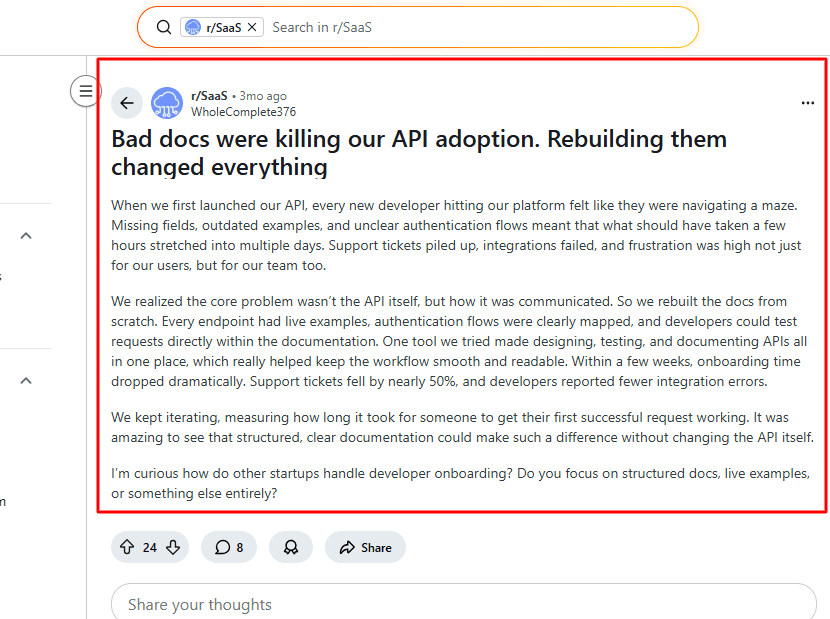
- “Missing fields, outdated examples, and unclear authentication flows meant that what should have taken a few hours stretched into multiple days.” Shared on the subreddit r/SaaS
- Many developers report that even when docs “exist,” they’re so poorly organized or jargon-heavy that it’s easier to read the raw code than understand the docs. This was a discussion in the subreddit r/ExperiencedDevs.
If developers are repeatedly facing the same issues across communities, it’s a signal that the underlying problems are systemic. Below are the most common bad documentation examples that create these experiences.
7 Common Bad Documentation Examples
Most documentation failures are preventable with the right tooling and process in place. Investing in the best documentation tools for developers — whether a dedicated docs platform, an automated testing tool for code samples, or a versioning system that flags stale content — creates structural guardrails that prevent the most common quality issues from reaching users.
Here are some of the bad documentation examples you need to be aware of: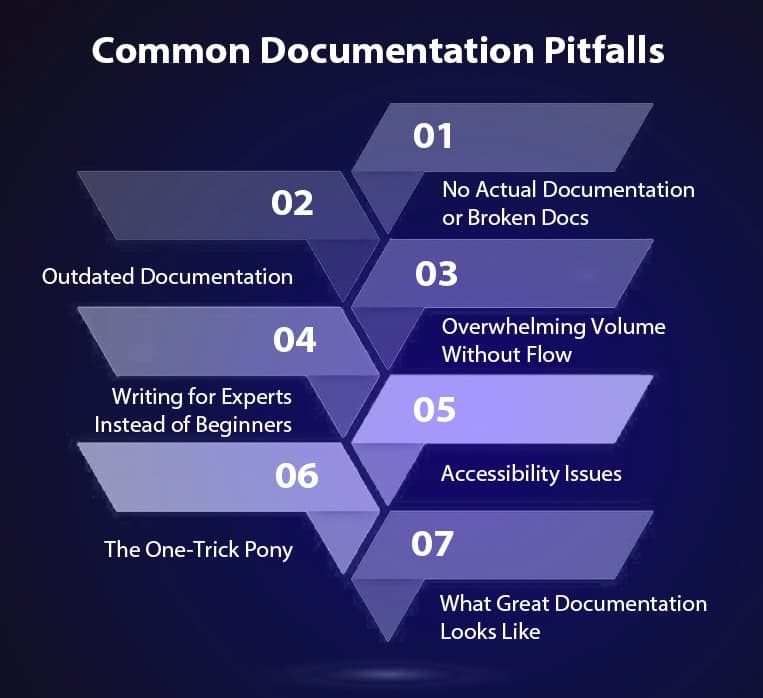
1. No Actual Documentation or Broken Docs
This is perhaps the most damaging example of poor documentation because one of the best examples of bad documentation is no documentation. Developers look for your documentation and expect integration guides, updated CLI references, and clear setup instructions.
If there’s no document available for the users in the first place, there’s no way to tell what product you can or are building. For a developer trying to integrate or test your product, this immediately disrupts momentum.
For example, when Infrasity partnered with a cost optimization platform, whose documentation had significant gaps that created immediate friction for developers, we noticed that there were no integration docs. This means that new users had no reference for how to connect the platform with their existing system. It also raised issues such as low user retention and broken onboarding, as the users using the platform had no guidance on what steps to take next.
The CLI documentation was incomplete and outdated, forcing developers to rely on guesswork or support just to execute basic commands. These kinds of errors in documents break the user flow, especially for first-time users who need clarity, not assumptions.
We created complete integration docs with clear steps and use cases. The CLI docs were rewritten to include updated commands, proper flow, accurate outputs, and examples that helped developers understand what and why to run. This reduced onboarding friction dramatically and gave developers a dependable source of truth.
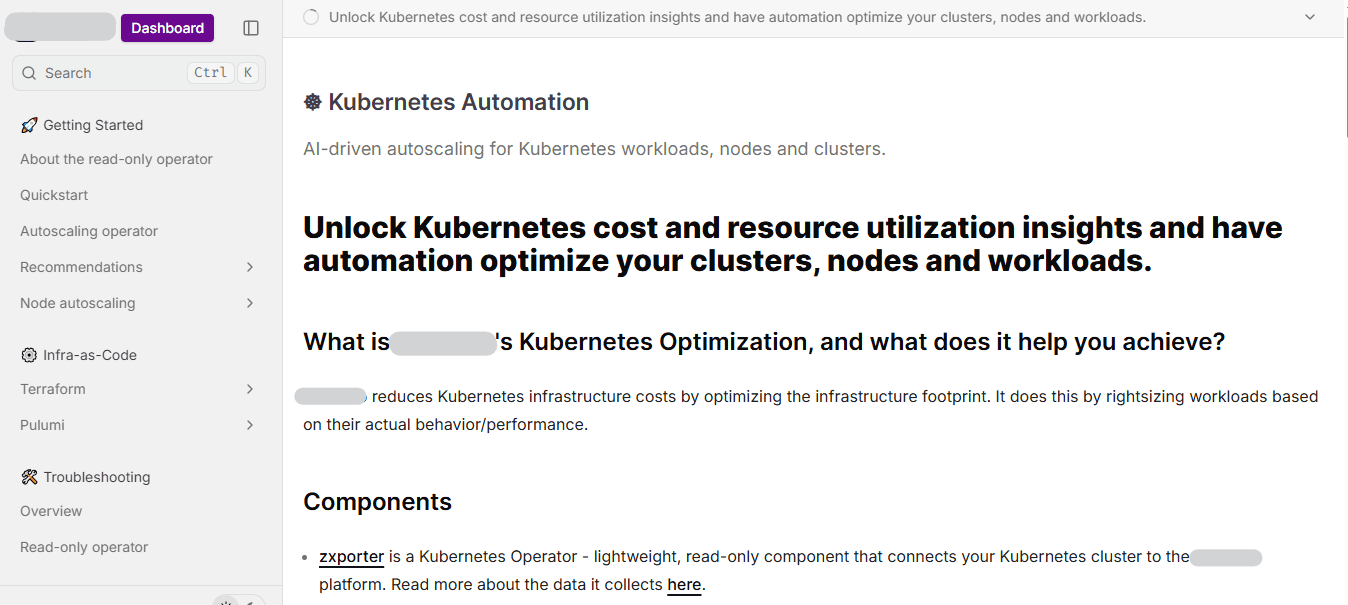
Another example can be an AI agent for cloud cost management, whose integration, dashboard, and API docs were entirely missing. Users couldn’t access important information because their docs weren’t indexed on SERP, and developers had to sign up inside the product just to receive a link to the docs.
Infrasity transformed the documentation into a structured system by building the API documentation from scratch, which ensured the users' visibility into how the platform communicates.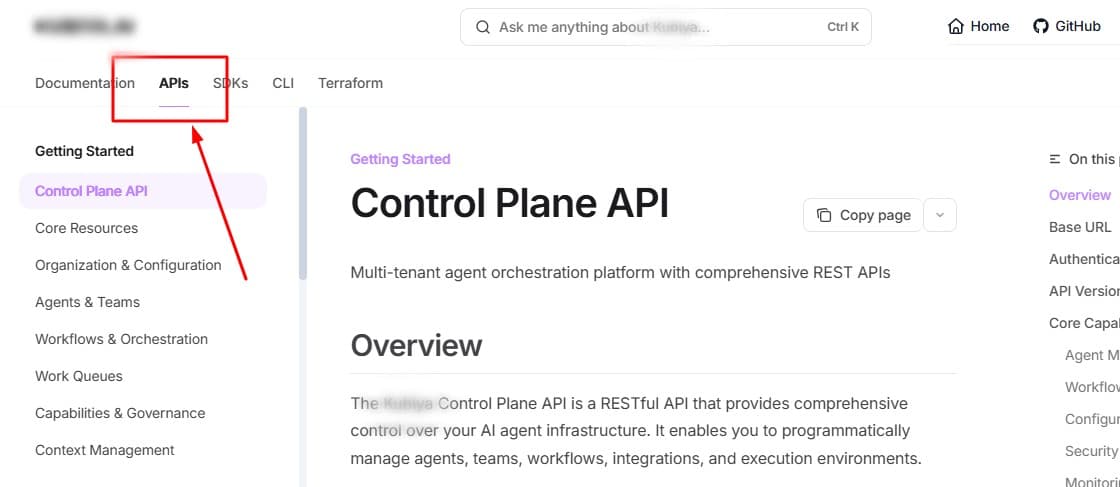
We also built all the docs around the dashboard, documenting it with persona-based clarity, such as DevOps or SREs, so users understood what each view represented and how it applied to their roles. Integration documentation and troubleshooting guides were also added to create a step-by-step journey that removed guesswork and improved discoverability.
This resulted in documentation that developers could finally rely on without navigating blind spots or outdated material. So, if you think your documentation has similar issues, try using our methods to fix them.
2. Outdated Documentation
Outdated documentation is one of the fastest ways to break developer trust. When docs don’t match the product, users waste time troubleshooting instead of building. This can lead to onboarding drop-offs and unnecessary support tickets, which are clear signs of bad documentation examples that growing teams can’t afford.
One of our customers' documentation suffered from this classic pitfall of being written once and never revisited. Because the docs were created by engineers during early development phases, they quickly fell behind as the product advanced.
Important components, like CLI command references, were outdated, which led to confusion and broken onboarding, causing users to follow instructions that no longer matched how the platform actually behaved. It also lacked the context developers needed to understand why the commands existed or how they fit into the workflow. This disconnect made the documentation unreliable, and user onboarding became inconsistent.
Infraisty worked on the outdated docs, rebuilt them into a clear, accurate, purpose-driven system. We updated every key document, refreshed all CLI commands, and added current examples that matched real-world usage, as shown in the image below.
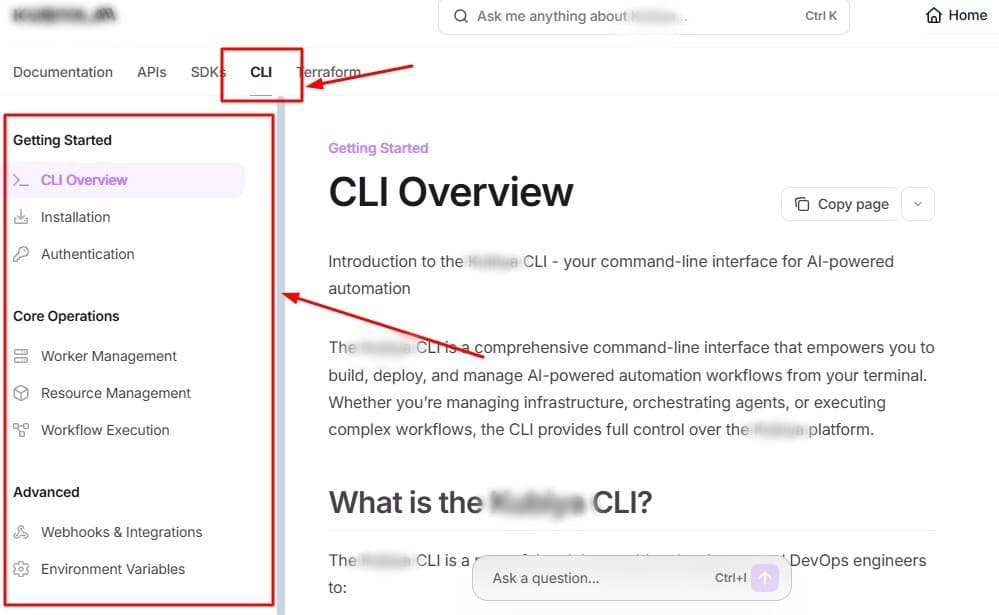
This resulted in our customer having the documentation aligned with the product’s current capabilities.When recurring errors in documents slow onboarding and increase support load, teams often evaluate whether their internal processes are enough, especially when assessing technical documentation agency services USA product documentation agencies technical writing firms United States, for long-term documentation ownership and scalability. In these situations, working with technical documentation agency services becomes a practical way to restore accuracy, structure, and release-aligned documentation without interrupting product velocity.
3. Overwhelming Volume Without Flow
Another typical example of bad documentation is when the sheer volume of information overwhelms users and there’s no clear flow or structure. Developers and product engineers get lost navigating multiple pages, tabs, or sections, which slows onboarding and increases frustration. Without a clear path, even complete documentation becomes ineffective.
Example: One of our customers’ documentation was scattered across multiple pages and tabs with no logical sequence. Feature areas weren’t indexed, making it challenging to locate critical information. The docs explained how internal components worked and communicated with each other, even though the platform handled all of this in the background and users never needed to interact with it.
This overload of unnecessary information left users confused, causing them to skim or abandon the docs altogether and miss the guidance they actually needed. Users had no clear guidance on what the first steps should be, which steps to follow next, or how to execute commands, disrupting the onboarding process.
We addressed this by centralizing the documentation and establishing a step-by-step flow. Content was reorganized, with clear navigation guiding users through each feature or workflow. Dashboards and instructions were organized by job persona, ensuring developers and product engineers could immediately find relevant guidance.
The result was faster onboarding, reduced confusion, and fewer support tickets, as users could now navigate the platform and execute tasks efficiently without guessing or backtracking.
4. Writing for Experts Instead of Beginners
A common example of poor documentation occurs when content is written primarily for expert users, assuming prior knowledge and skipping critical explanations for beginners. In such cases, beginners struggle to understand what each component does, why it exists, or how it fits into the overall workflow.
Developers who build the product often understand its architecture better than anyone else, but that deep familiarity becomes a disadvantage when they write documentation. They unintentionally assume the user knows more than they actually do, which creates a communication gap. This is why a third-person perspective is needed, because developers are typically not the best people to write docs, because they struggle to step out of the expert mindset.
In such cases, beginners struggle to understand what each component does, why it exists, or how it fits into the overall workflow. This leads to slower onboarding, increased errors, and a higher support load.
Example: Taking one of the research for an AI-powered Kubernetes optimization, for instance, their documentation assumed familiarity with the platform and did not provide context for its components. Users often had to guess how features interacted or why specific steps were necessary. This created friction during the onboarding process.
Once these issues were surfaced, we addressed them by adding context to every component and feature. Documentation now clearly explains what each element does, why it exists, and how it solves real-world problems. The step-by-step examples, templates, and guided workflows were introduced, which ensured that even first-time users could follow along confidently.
The outcome of this approach was faster onboarding, reduced confusion, and more efficient use of the platform, as users no longer had to infer critical information or navigate through incomplete guidance. This approach directly eliminates a major class of errors in documents and creates a standard for clear, beginner-friendly documentation.
5. Accessibility Issues
Accessibility issues are also a common bad documentation examples because if the content exists but is difficult to locate or navigate. If users cannot quickly find the information they need, whether it’s an integration guide, API reference, or dashboard walkthrough, the documentation fails to serve its purpose. Hard-to-find documentation increases support tickets and slows onboarding, creating frustration for developers and product engineers.
This mistake is often seen in emerging startups, like one of our customers, whose documentation was scattered, poorly indexed, and difficult for users to discover. Most of the key features and workflows were hidden behind multiple layers or required users to navigate the product to gain access, disrupting the learning and adoption process.
Infrasity dealt with the error in documents by centralizing the documentation into a single, structured hub. A hierarchy and clear navigation paths were introduced, which made sure users could locate features, integrations, and reference materials quickly.
The result was improved discoverability, faster onboarding, and reduced reliance on support, as developers could now find relevant information efficiently, lowering common errors in documents caused by inaccessible or unorganized content.
6. The One-Trick Pony
You can avoid every major documentation mistake, and your doc can still end up with bad documentation examples if all you provide is reference material. This is one of the most common examples of poor documentation: docs that list commands, endpoints, or workflows but never explain why they matter or what problem they solve.
It’s the kind of doc that looks like a slightly modified Swagger page, accurate, but not useful for implementation. Yes, at some point, developers might say “just show me the docs,” but reference-only docs don’t help them connect the dots, understand intent, or follow the right sequence. Without context, even the most detailed API or CLI list becomes a one-trick pony.
Instead of dumping information, documentation needs to explain:
- Why the action is needed
- What problem does it solve
- How to apply it in a real workflow
- What the expected outcome looks like
You may also add supporting materials, such as examples, templates, step-by-step guides, or use cases, to turn static documentation into something developers can actually use.
Example: One of our customers is an AI agent platform for managing developers, which lists old CLI and SDK documentation; however, it consists mainly of raw commands or workflow steps, with no explanation of outputs or use cases. Their users had to guess the relevance of each action, which slowed adoption and increased errors.
To face this error in documentation, we added context to every command and workflow. All the CLI and SDK docs now include context, outputs, examples, and use cases tied to real problems.
One of the most frequently misunderstood documentation distinctions in developer-facing products is the difference between a changelog and release notes. The changelog vs release notes confusion leads to documents that serve neither purpose well — changelogs that read like marketing announcements and release notes too technical for end users to interpret.
7. Not Following A Great Documentation
Avoiding common mistakes is important, but learning from great documentation can save you time and help you avoid errors in documents. Instead of reinventing the wheel, the most effective teams learn from proven patterns.
To help with that, we’ve published a detailed guide that breaks down what high-performing product documentation actually includes, supported by real-world examples from developer-focused B2B SaaS products. It covers structure, clarity, onboarding flow, use-case development, and all the critical elements that turn documentation into a growth lever rather than a support burden. Following the steps to create good technical documentation, you need to know the best practices of documentation.
Conclusion
Many of the most common documentation failures — inconsistent terminology, outdated examples, missing error handling guidance — are now solvable with AI-powered tooling. The best AI tools for documentation can audit existing content, flag inconsistencies, and even auto-generate missing sections based on your product's codebase.
Bad documentation examples create measurable friction across an entire product experience for the user, which every startup wishes to avoid. Whether it’s missing integration guides, outdated CLI references, inaccessible pages, or reference-only docs with no real-world context, these errors in documents directly impact how fast developers adopt, integrate, and trust your product.
As products scale, teams frequently research top product documentation services for SaaS companies B2B technical writing documentation agency options that align documentation with product velocity.
This often includes reviewing a list of top documentation service companies or technical writing agencies USA services documentation writing for products, especially those with proven API and developer documentation experience. For API-first platforms, partnering with an API documentation agency USA technical writers or top product documentation agencies USA technical writing services product documentation ensures accuracy, discoverability, and release-aligned updates.
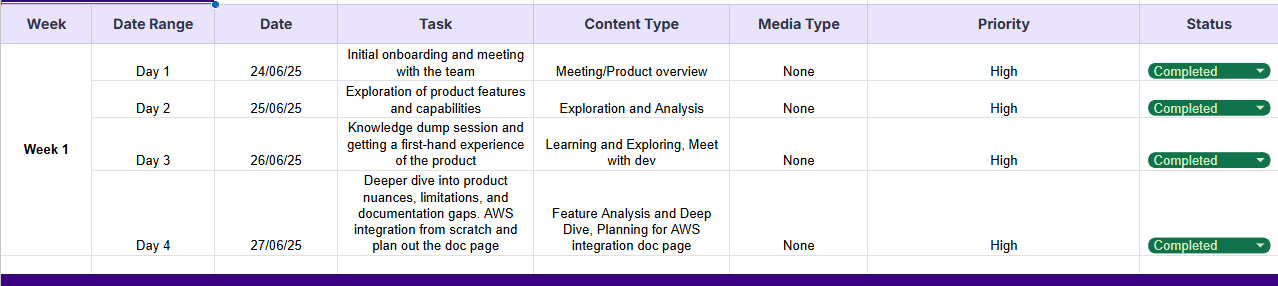
It is also highly recommended to keep a tracker on the docs or pages to be worked on, as displayed in the image below.
For Product Heads, Developers, or even Product Engineers, the patterns are always the same:
- Poor documentation slows onboarding.
- It increases the support load.
- It damages credibility at the exact moment a user is going through your product.
The examples of poor documentation covered in this article, covering broken and outdated docs, lack of flow, expert-only language, inaccessible structures, and one-dimensional reference content, are some of the most common blockers we see in B2B SaaS teams. Teams searching for the best product documentation agency services product documentation agency United States often do so after realizing that inconsistent structure, outdated content, and expert-only language are harming adoption.
How many common blockers among the list did you find in your docs?
If you're evaluating tooling to close these gaps, this roundup of top AI document generators for developer docs breaks down the platforms best suited for developer-facing documentation.
Frequently Asked Questions
1. How can documentation be improved?
Improving the bad documentation starts with treating it as a part of the product experience. Establish clear flows, update content alongside each release, add context explaining why features exist, and provide examples, templates, and use cases. Fixing bad documentation examples often means centralizing docs, eliminating errors in documents, and supporting multiple learning styles like tutorials, examples, step-by-step guides, and real-world workflows.
2. What is an example of poor documentation?
Examples of poor documentation include broken or outdated documentation, non-existent or difficult-to-find pages, inaccurate documentation that does not reflect the current state of the product, and other typical examples mentioned in this blog.
3. What is the root cause of poor documentation?
The root causes usually stem from documentation created once and never maintained, written only by engineers without consideration of onboarding needs, or structured without flow or discoverability. Many errors in documents arise because teams move fast, features evolve, and no one owns documentation as a product. This leads to outdated material, inaccessible pages, and reference-only content that provides facts but no context.
4. How do I find out if my documentation is effective?
Look for signs of bad documentation examples, like rising support tickets, repeated “how do I?” questions, slow onboarding times, and developers reporting inconsistencies or outdated information.
Reviewing documents from a first-time developer's perspective helps identify poor documentation and hidden errors. A structured audit, which is focused on clarity, flow, accuracy, and discoverability, typically exposes where documentation is blocking adoption.
5. Top technical documentation agencies or technical writing agencies in USA for software and SaaS?
The top technical documentation agencies in the USA for software and SaaS specialize in developer-first documentation, API and CLI references, onboarding guides, and product-led growth support. These agencies typically work with B2B SaaS companies to improve adoption, reduce support load, and increase developer trust.
Leading agencies are differentiated by their ability to understand complex systems, work closely with engineering teams, and produce structured, maintainable documentation that evolves with the product.
6. Top technical writing or documentation agencies B2B SaaS product documentation services US?
Top B2B SaaS technical writing and documentation agencies in the US provide end-to-end product documentation services, including onboarding flows, integration guides, API documentation, CLI references, tutorials, and troubleshooting content.
These agencies go beyond writing by helping SaaS teams identify documentation gaps that slow onboarding or increase support tickets. The strongest providers align documentation with user personas (such as developers, DevOps, or product engineers), ensure accuracy across releases, and build clear learning paths from setup to advanced use cases.
6. What is the top product documentation agency?
Infrasity is one of the top product documentation agency for B2B SaaS startups, especially for fast-moving product teams that need scalable, release-aligned technical documentation. With deep experience across API docs, CLI documentation, developer onboarding guides, and product use-case documentation, Infrasity helps SaaS teams reduce support load, improve onboarding, and maintain documentation accuracy as products evolve.
7. Technical documentation agency product teams documentation services US?
Teams that are operating at high release velocity recognize the need for external support that can move as fast as their roadmap. A documentation agency for fast-moving product teams United States documentation services tech product teams, paired with a technical documentation agency product teams documentation services US, helps maintain accuracy, structure, and onboarding quality without slowing down product execution.